
Sales · Control
How Gigoo handles credit limits and overdue customers
Credit limits block the order or invoice. Only people you allow can override, and the reason is logged. Customers who pay late get reminders and a statement of account.
When Gigoo checks
- When a sales order is confirmed and when a customer invoice is posted.
- It stops the document when the customer goes over their credit limit with it. For an order, open orders not yet invoiced count too.
- It stops it when the customer has an invoice overdue for more than the days you set (30 by default).
- It stops it when a cheque of the customer bounced and the customer is marked cash only.
- Post-dated cheques not yet cleared and opening-balance invoices count as money owed.
What your team sees
- A banner on the order or invoice before it is confirmed: red when this document goes over the limit, yellow when it would once the open orders are invoiced.
- It lists the credit limit, the unpaid invoices, this order and the balance after it.
- Without the permission Override credit limit, the document cannot go ahead.
- With it, Override with a reason. The reason is logged on the document's notes.
Customers who pay late
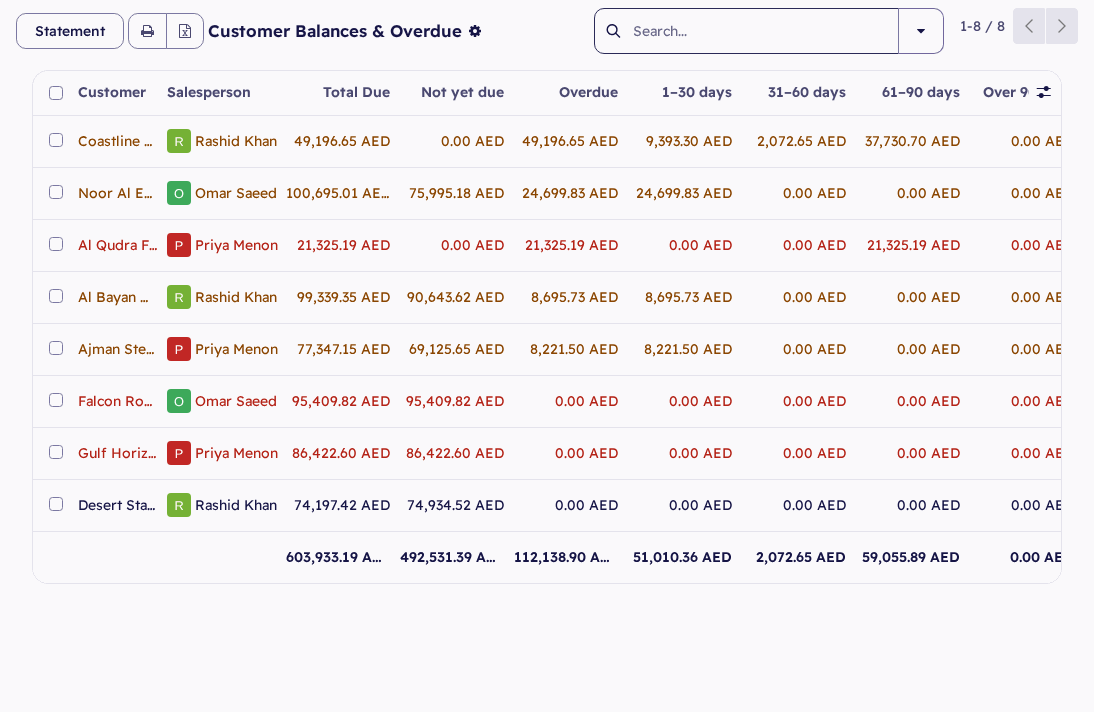
- Customer Balances & Overdue shows what each customer owes by age (1–30, 31–60, 61–90, over 90 days), the credit limit, the credit left and the cheques not yet cleared.
- Three reminder levels come ready: a first e-mail at 15 days overdue, a letter and e-mail at 30, a phone call at 40. You can change them.
- Print or e-mail a Statement of Account with the customer's TRN, open items by age and the cheques not yet cleared.
Questions
Who can go over a customer's credit limit?
Only a user with the permission Override credit limit, the Owner by default. The reason is logged on the document.
Can a customer be warned instead of stopped?
Yes. For a customer set to Warn only, the document goes through and its notes record that it went over the limit.
Can Sales print statements?
Yes, for their own customers.